Ballpoint Signature: Elevating Casual Design Without Sacrificing Professionalism
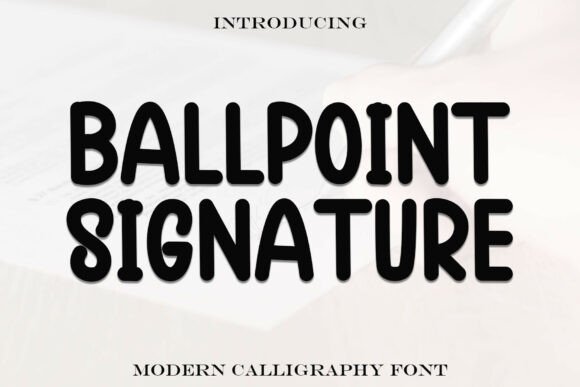
In the crowded landscape of digital typography, finding a typeface that feels genuinely human is a rare achievement. Ballpoint Signature stands out because it successfully bridges the gap between authentic handwriting and functional design. It is a playful and approachable handwritten font that mimics the casual charm of pen-on-paper writing, yet it avoids the chaotic illegibility that plagues many script fonts. Its rounded edges and bold form bring a touch of whimsy while maintaining readability, making it perfect for personal branding, packaging, educational materials, and friendly social media graphics.
However, the very qualities that make this typeface appealing are also what lead designers and business owners astray. Because it looks effortless, there is a tendency to treat it carelessly. When used correctly, Ballpoint Signature adds warmth and trust to your visual communication. When misapplied, it can undermine your message, reduce accessibility, or make a professional brand look amateurish. Understanding the nuances of this specific typeface is essential for achieving results that feel both personal and polished.
The Readability Trap in Handwritten Typography
The most frequent mistake when working with Ballpoint Signature is assuming that "handwritten" automatically means "display only." While the font is designed with superior legibility compared to traditional calligraphy scripts, it still carries the inherent texture of analog writing. A common error occurs when designers use this typeface for dense body copy or small-scale UI elements. The rounded terminals and variable stroke widths that give the font its character can cause visual vibration at sizes below 14px on screens or 8pt in print.
This misuse directly impacts user experience and information retention. If you are creating educational materials or product packaging where clarity is paramount, forcing a handwritten style into functional spaces creates cognitive friction. Readers should not have to decipher your ingredients list or instructional text. Instead, reserve Ballpoint Signature for headlines, pull quotes, signatures, and short emphasis text. Pair it with a clean, geometric sans-serif or a highly readable serif for body content. This contrast not only preserves the charm of the handwritten element but actually enhances it by giving the eye a place to rest.
Misjudging Weight and Hierarchy
Another overlooked detail involves the bold form of the typeface. Ballpoint Signature has a distinct visual weight due to its marker-like construction. Beginners often fail to account for this density when establishing typographic hierarchy. Placing this font next to a thin or light-weight sans-serif can create an unbalanced composition where the handwritten element screams for attention rather than inviting engagement.
To avoid this, evaluate the optical weight of your supporting fonts before finalizing your layout. You may need to use a medium or semi-bold weight in your secondary typeface to hold up against the robust nature of Ballpoint Signature. In social media graphics, where space is limited, this balance is critical. A top-heavy design where the headline overwhelms the subtext looks unplanned. Test your combinations at actual viewing size; what looks balanced on a 27-inch monitor may appear disjointed on a mobile screen.
Contextual Alignment and Brand Voice
Typography is voice made visible, and Ballpoint Signature speaks in a tone that is informal, nostalgic, and intimate. A significant strategic error occurs when creators select this font based solely on aesthetics rather than brand alignment. Using a playful, rounded script for industries requiring high authority, clinical precision, or luxury exclusivity can send mixed signals. For example, a financial advisor using this font for compliance documents or a medical clinic using it for surgical consent forms risks eroding trust through tonal dissonance.
Before downloading or purchasing, audit your brand’s core values. Does your audience expect approachability and creativity, or do they require distance and formality? Ballpoint Signature excels in contexts like artisanal food packaging, children’s education, lifestyle blogging, coaching services, and community-focused non-profits. It suggests that a real person is behind the message. If your goal is to convey institutional stability or cutting-edge tech innovation, this typeface may work against you regardless of how beautifully it is set.
The Licensing Oversight
For freelancers and small business owners, the excitement of finding the perfect font often overshadows the practicalities of licensing. A costly mistake involves using a personal-use version of Ballpoint Signature for commercial projects. This includes client work, monetized YouTube thumbnails, merchandise for sale, or paid advertising. Many designers assume that if a font is free to download, it is free to use everywhere. This assumption exposes businesses to legal risks and potential rebranding costs down the line.
Always verify the specific license terms before integrating the font into any revenue-generating asset. Commercial licenses typically cover desktop use, webfont embedding, and sometimes app or e-pub usage as separate tiers. Investing in the correct license upfront is not just a legal safeguard; it supports the type designer and ensures you receive proper file formats, including OpenType features that may be stripped from free versions. These features often include alternate characters, ligatures, and swashes that are vital for making Ballpoint Signature look natural rather than repetitive.
Technical Application and Spacing Adjustments
Even with the right context and license, poor technical execution can ruin the effect. Handwritten fonts simulate the connected flow of analog writing, but digital rendering requires manual intervention. A pervasive issue is leaving tracking (letter-spacing) at default settings. Ballpoint Signature is designed with specific kerning pairs, but applying positive tracking to mimic modern minimalist trends will break the connections between letters, destroying the illusion of handwriting. Conversely, negative tracking can cause overlapping glyphs to become muddy and illegible.
- Avoid artificial stretching: Never distort the aspect ratio of the font to fit a space. This makes the strokes look uneven and unprofessional.
- Respect the baseline: Handwritten fonts often have varying baselines. Do not force-align them to a strict grid if it breaks the natural rhythm of the script.
- Check OpenType alternates: Use stylistic sets to vary repeating letters in words like "balloon" or "signature" to maintain organic authenticity.
- Test on multiple backgrounds: The bold, rounded edges may bleed into dark backgrounds or disappear on textured paper. Always proof in the final output medium.
Evaluating Alternatives and Combinations
Finally, effective design requires knowing when not to use a specific tool. Before committing to Ballpoint Signature, compare it against other options in your library. Does another script offer better multilingual support for your international audience? Is there a cleaner alternative that reads faster for mobile users? Sometimes, the best choice is a hybrid approach, using Ballpoint Signature only for the logo or primary tagline while selecting a more neutral handwritten font for secondary accents.
When pairing, avoid combining Ballpoint Signature with other decorative or script fonts. Two personalities competing for attention result in visual noise. Stick to the rule of one display font per project. Let the rounded, bold charm of Ballpoint Signature be the singular moment of human connection in your design system. By approaching this typeface with intention, respecting its technical constraints, and aligning it with the appropriate emotional context, you transform it from a mere decorative element into a powerful asset for authentic communication.