Novox Heartbreak: Integrating Raw Display Typography into Creative Workflows
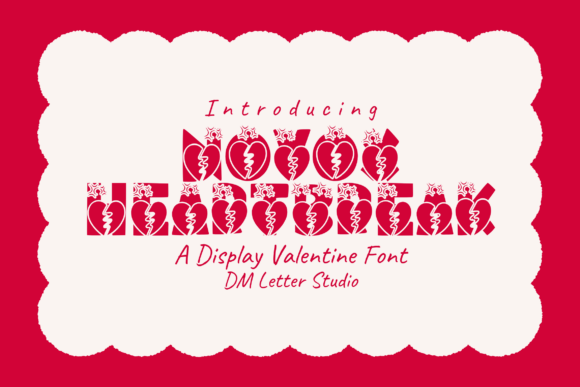
Selecting the right typeface is rarely just an aesthetic choice; it is a strategic decision that defines the tone, readability, and emotional resonance of a project. For designers, marketers, and content creators working within alternative, grunge, or high-impact niches, standard sans-serif or serif options often fail to convey necessary intensity. Novox Heartbreak serves as a specialized tool in these scenarios. It is a dramatic, expressive display font characterized by jagged edges and a handcrafted texture that communicates rebellion, heartbreak, and raw emotion. Understanding how to integrate this specific asset into your design workflow requires moving beyond simple installation and considering its role in pre-production planning, active design execution, and final output optimization.
Strategic Pre-Production and Asset Selection
Before opening your design software, it is essential to determine if Novox Heartbreak aligns with the project’s communication goals. This typeface is not a utility player; it is a statement piece. During the briefing or mood-boarding phase, evaluate whether the project demands an "anti-polished" aesthetic. This font excels in contexts where perfection feels disingenuous. If you are designing for urban streetwear brands, independent music labels, or editorial content focused on mental health and resilience, this asset fits the strategic brief. However, if the goal is corporate trust or luxury minimalism, this selection will likely create cognitive dissonance for the audience.
In the preparation stage, consider the hierarchy of information. Novox Heartbreak is designed as an all-caps display face. This structural limitation should inform your layout planning early. Because it lacks lowercase characters, it cannot function as body copy or secondary subheadings. Your workflow must account for pairing this font with a highly legible, neutral typeface for supporting text. Establishing this pairing relationship before beginning the design prevents friction later in the process. Test combinations with clean grotesques or monospaced fonts during the sketching phase to ensure the visual weight of Novox Heartbreak does not overwhelm the necessary informational content.
Execution: Managing Texture and Visual Weight
During the active design phase, the unique characteristics of Novox Heartbreak require specific technical handling. The font features emotive edge designs with bold, cracked, and imperfect letterforms. These details are the primary value proposition, but they also present usability challenges. When setting type, avoid tight tracking. The irregular edges and jagged terminals need negative space to remain distinct. Overlapping these characters can result in illegible clusters that degrade the user experience, particularly on digital screens. A practical workflow adjustment is to increase letter-spacing by 10–20% compared to standard display fonts to preserve the integrity of the handcrafted texture.
Color selection interacts directly with the font’s distressed nature. High-contrast combinations, such as white text on a black background or vice versa, tend to maximize the visibility of the cracks and imperfections. Conversely, low-contrast color schemes or complex photographic backgrounds can cause the textured edges to vibrate or disappear entirely. When using Novox Heartbreak over imagery, implement a solid overlay or gradient mask behind the text area. This ensures the emotional flair of the letterforms remains the focal point rather than competing with visual noise. This step is critical for maintaining quality control across different viewing environments.
Pairing and Hierarchy Implementation
Successful integration relies heavily on what surrounds the display font. Treat Novox Heartbreak as the anchor of your composition. In a band poster or album cover workflow, this might mean placing the font at the top third of the canvas to establish immediate attitude. For digital assets like social media graphics or web headers, position it centrally but allow ample padding. The "handmade feel" of the font adds significant visual density; without adequate whitespace, the layout can feel claustrophobic. Use grid systems to impose order on the chaotic nature of the typeface. Aligning the jagged text to a strict underlying grid creates a compelling tension between structure and expression, which is often the hallmark of professional grunge design.
Technical Compatibility and Output Optimization
A major factor in workflow efficiency is technical compatibility. Novox Heartbreak is engineered to work flawlessly across major design tools, including Adobe Creative Cloud, Affinity Designer, and web-based platforms like Canva or Figma. However, rendering engines interpret distressed vectors differently. Before finalizing any project, conduct cross-platform proofing. A crack that looks intentional in Illustrator may render as a pixelation artifact in a browser or a printing RIP software. Export test files at actual size to verify that the fine details of the letterforms hold up at the intended physical or digital dimensions.
For print production, specifically regarding band posters or packaging, consult with your printer regarding ink spread. The rough edges of Novox Heartbreak can fill in on uncoated papers or newsprint due to dot gain. Request a physical proof or adjust the stroke weight slightly in your file to compensate for the substrate. In digital workflows, optimize SVG exports for web use. Complex paths created by jagged edges can inflate file sizes. Use path simplification tools to reduce node count without sacrificing the recognizable silhouette of the characters. This balances aesthetic fidelity with site performance, ensuring the edgy creativity does not compromise load times.
Use Cases and Contextual Application
Understanding specific applications helps streamline the decision-making process for future projects. Novox Heartbreak is particularly effective in the following workflows:
- Music Industry Assets: Ideal for rock, metal, punk, and alternative genres. Use for album titles, tour dates, and merchandise. The font’s aggressive stance matches the sonic identity of these genres, reducing the cognitive gap between audio and visual branding.
- Seasonal Counter-Marketing: Perfect for anti-Valentine’s Day campaigns or breakup-themed content. Instead of traditional romantic scripts, this font signals irony, empowerment, or melancholy, allowing brands to tap into alternative seasonal sentiments authentically.
- Streetwear and Apparel: Effective for bold back prints, chest logos, and hangtags. The rugged character translates well to fabric textures and distressed garment treatments. Ensure the design file accounts for screen printing mesh counts to retain detail.
- Editorial and Blogging: Suitable for pull quotes, chapter titles, or featured images in articles discussing difficult topics, personal growth, or cultural critique. It adds a layer of visceral honesty that polished typography cannot achieve.
Maintaining Consistency Across Campaigns
When incorporating Novox Heartbreak into a broader brand identity or recurring campaign, consistency is key to long-term recognition. Create a style guide entry specifically for this asset. Document the approved color palettes, minimum sizing, clearance zones, and approved companion fonts. This documentation prevents misuse by junior designers or external freelancers who may not intuitively understand the balance required for distressed typography. Define clear boundaries for when not to use the font. For example, specify that while Novox Heartbreak is appropriate for event headlines, it should never be used for ticket information, pricing, or legal disclaimers. This operational clarity reduces revision cycles and maintains professional standards.
Furthermore, consider the lifecycle of the asset. Display fonts with strong personalities can fatigue an audience if overused. Plan for rotation or variation within your creative strategy. You might use Novox Heartbreak for the launch phase of a campaign to grab attention, then transition to cleaner typography for the retention or informational phases. This dynamic approach keeps the visual language fresh while leveraging the font’s strength where it matters most: initial impact and emotional connection.
Evaluating Workflow Efficiency and ROI
Integrating a specialized font like Novox Heartbreak should ultimately save time and enhance output quality. By having a go-to solution for "edgy" or "emotional" briefs, you eliminate hours spent browsing generic libraries or attempting to artificially distress clean fonts. The authentic, sketch-like texture is baked into the vector data, removing the need for post-processing effects that can be inconsistent or non-scalable. Measure the success of this integration not just by aesthetic approval, but by workflow velocity. If using this font reduces concept-to-final turnaround time for grunge-style projects while maintaining high engagement metrics, it validates the asset's place in your permanent toolkit.
Finally, always respect licensing and usage rights as part of your professional workflow. Ensure your license covers the specific commercial applications you intend, whether that is digital advertising, physical merchandise, or broadcast media. Proper asset management protects your business from legal risk and supports the type designers who create these specialized tools. By treating Novox Heartbreak as a professional instrument rather than a decorative afterthought, you elevate both your creative process and the final deliverables presented to clients and audiences.